Analyze Salesforce Debug LogsEfficiently & Fast
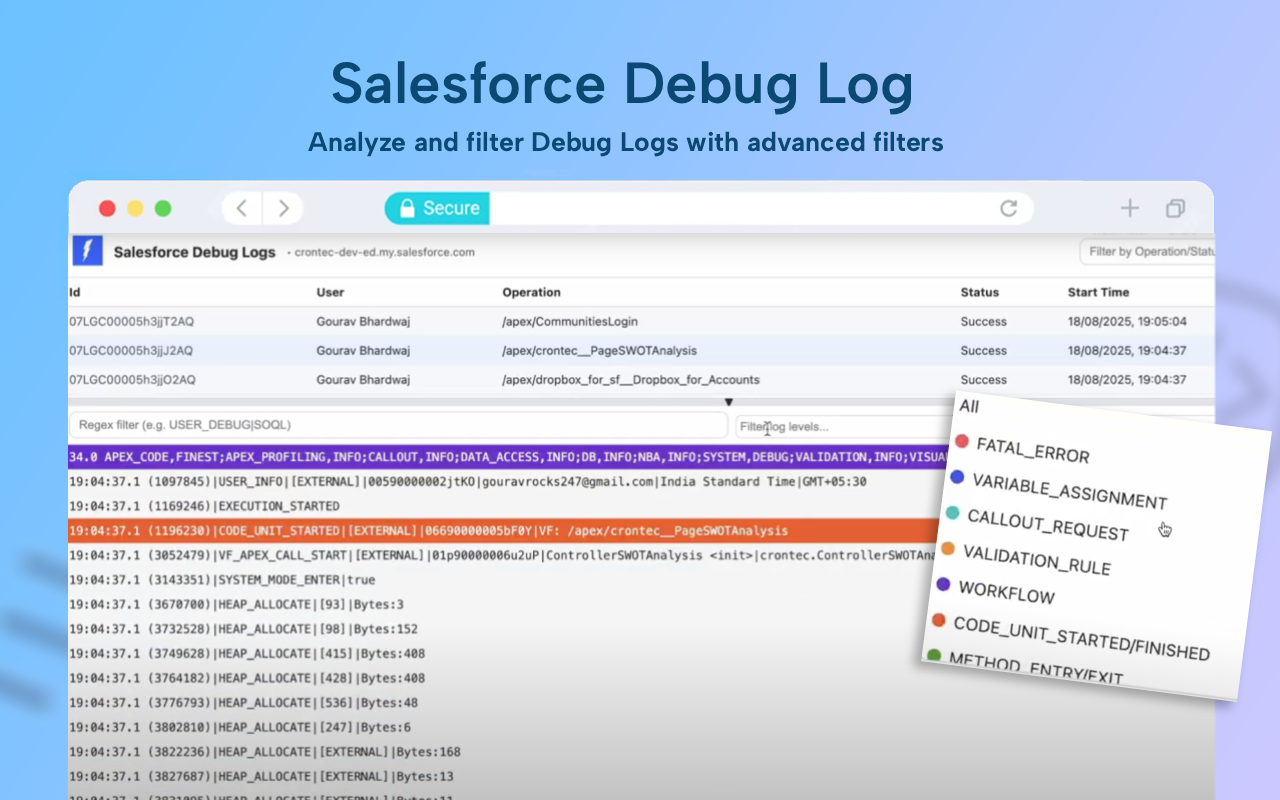
LogMachine is a free, powerful tool that helps you analyze Salesforce Debug logs with ease. Get insights faster with our intuitive interface and smart filtering capabilities.
See LogMachine in Action
Watch this quick tutorial to learn how to analyze your Salesforce debug logs efficiently
Powerful Features
Everything you need to analyze and understand your Salesforce debug logs
Lightning Fast
Fast load time thanks to lightweight framework behind the design. Get your logs analyzed in seconds, not minutes.
Smart Refresh
Refresh button to get the latest logs instantly. Saves bandwidth and time by only fetching what you need.
Color-Coded Logs
Provides unique color labels for different log levels. Instantly identify errors, warnings, and debug messages.
Smart Filters
Easy to filter and analyze log levels using smart filters. Find exactly what you are looking for in seconds.
Readable Typography
Right font selection for better readability of the log. Designed for extended reading sessions.
Chrome Extension
Enhanced features with our Chrome extension including test class coverage reports and browser-based log analysis.
Chrome Extension
Take LogMachine to the next level with our powerful Chrome extension. Get additional features right in your browser.
- ✓Test Class Coverage Reports - Analyze your Apex test coverage directly in the browser
- ✓Browser-Based Log Analysis - Analyze logs without leaving Salesforce
- ✓One-Click Access - Quick access to LogMachine from any Salesforce page
- ✓Enhanced Filtering - Advanced filtering options for complex log analysis
Salesforce Dev Toolkit
Install now and unlock powerful features for Salesforce development
Get Started
Login using your Salesforce Account or try without signing in